

在經營 WordPress 網站時,許多人會透過撰寫開箱、評測或教學文章來推薦商品,而搭配聯盟行銷分潤連結,不僅能提供讀者快速前往購買的管道,也能為網站帶來額外的收益。然而,若只是直接貼上長串的分潤網址,不但影響版面美觀,也容易降低讀者點擊的意願。
因此,我將 momo 與 蝦皮 的分潤網址設計得更直覺、更具吸引力,讓讀者能夠一鍵前往不同平台比價,同時兼顧網站的閱讀體驗與聯盟行銷效益


1. 第一步:登入後台
- 登入 WordPress 的後台
https://你的網站/wp-admin
2. 加入 css 程式碼
- 選擇外觀,點擊自訂

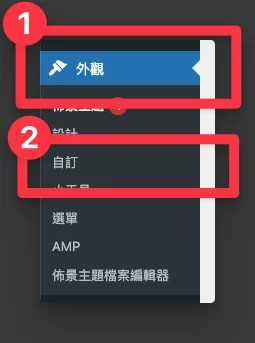
- 點擊附加的 CSS


- 加入以下程式碼
/* =======================================================
   Floating Product Card
======================================================= */
.floating-product {
    position: fixed;
    right: 20px;
    bottom: 100px;
    width: 260px;
    background: #ffffff;
    border: 1px solid #e5e5e5;
    border-radius: 12px;
    box-shadow: 0 8px 24px rgba(0,0,0,.18);
    padding: 15px;
    z-index: 9999;
    display: none;
    opacity: 0;
    transform: translateX(40px);
    transition:
        opacity .35s ease,
        transform .35s ease,
        box-shadow .25s ease;
}

/* 顯示動畫 */
.floating-product.show {
    display: block;
    opacity: 1;
    transform: translateX(0);
}

/* Hover */
.floating-product:hover {
    box-shadow: 0 12px 30px rgba(0,0,0,.25);
}

/* 商品圖片 */
.floating-product img {
    display: block;
    width: 75%;
    max-width: 180px;
    height: auto;
    margin: 0 auto;
    object-fit: contain;
}

/* 商品名稱 */
.floating-product h4 {
    margin: 12px 0;
    text-align: center;
    font-size: 18px;
    font-weight: bold;
    color: #333;
    line-height: 1.4;
}

/* 按鈕 */
.floating-product a {
    display: block;
    text-align: center;
    text-decoration: none;
    background: #ee4d2d;
    color: white;
    border-radius: 8px;
    padding: 12px;
    margin-top: 10px;
    font-weight: bold;
    transition: background .25s;
}

.floating-product a:hover {
    background: #d93d20;
    color: white;
}

/* 關閉按鈕 */
.close-card {
    position: absolute;
    top: 8px;
    right: 8px;
    width: 28px;
    height: 28px;
    border: none;
    border-radius: 50%;
    background: #f2f2f2;
    color: #666;
    font-size: 18px;
    line-height: 28px;
    text-align: center;
    cursor: pointer;
    padding: 0;
    transition: all .2s;
}

.close-card:hover {
    background: #ddd;
    color: #000;
}

/* ============================
   手機版
============================ */
@media (max-width:768px){
    .floating-product {
        width: 170px;
        right: 10px;
        bottom: 90px;
        padding: 10px;
    }

    .floating-product img {
        display: block;
        width: 75%;
        max-width: 180px;
        height: auto;
        margin: 0 auto;
        object-fit: contain;
    }

    .floating-product h4 {
        font-size: 14px;
        margin: 8px 0;
    }

    .floating-product a {
        font-size: 12px;
        padding: 8px;
    }

    .close-card {
        width: 22px;
        height: 22px;
        line-height: 22px;
        font-size: 14px;
    }
}

/* ============================
   超小螢幕
============================ */
@media (max-width:480px){
    .floating-product {
        width: 150px;
        right: 8px;
        bottom: 80px;
        padding: 8px;
    }

    .floating-product img {
        display: block;
        width: 75%;
        max-width: 180px;
        height: auto;
        margin: 0 auto;
        object-fit: contain;
    }

    .floating-product h4 {
        font-size: 13px;
    }

    .floating-product a {
        font-size: 11px;
        padding: 7px;
    }
}


3. 加入 JavaScript 程式碼
- 選擇外觀,點擊佈景主題檔案編輯器

- 選擇 header.php

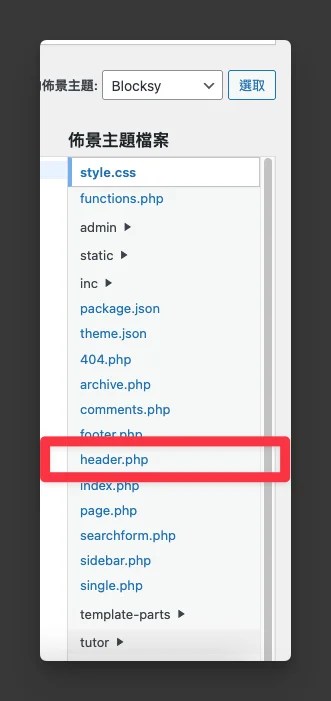
- 加入以下程式碼
<script>
document.addEventListener("DOMContentLoaded", function () {
    const card = document.getElementById("floatingCard");
    const closeBtn = document.getElementById("closeCard");

    if (!card || !closeBtn) return;

    // ==========================
    // 設定
    // ==========================
    const SHOW_PERCENT = 0.1;          // 捲動10%才顯示
    const HIDE_HOURS = 1;              // 關閉後1小時不再顯示
    const STORAGE_KEY = "floating_card_closed";

    // ==========================
    // 是否已被關閉
    // ==========================
    function isClosed() {
        const closeTime = localStorage.getItem(STORAGE_KEY);

        if (!closeTime) {
            return false;
        }

        const now = Date.now();
        const diff = now - Number(closeTime);

        if (diff > HIDE_HOURS * 60 * 60 * 1000) {
            localStorage.removeItem(STORAGE_KEY);
            return false;
        }

        return true;
    }

    // 如果24小時內已關閉,直接結束
    if (isClosed()) {
        return;
    }

    // ==========================
    // 顯示卡片
    // ==========================
    function showCard() {
        if (card.classList.contains("show")) {
            return;
        }

        card.style.display = "block";
        requestAnimationFrame(function () {
            card.classList.add("show");
        });
    }

    // ==========================
    // 隱藏卡片
    // ==========================
    function hideCard() {
        card.classList.remove("show");

        setTimeout(function () {
            if (!card.classList.contains("show")) {
                card.style.display = "none";
            }
        }, 350);

    }

    // ==========================
    // Scroll
    // ==========================
    window.addEventListener("scroll", function () {
        // 已經關閉就不要再判斷
        if (isClosed()) {
            return;
        }

        const scrollHeight = document.documentElement.scrollHeight - window.innerHeight;

        if (scrollHeight <= 0) {
            return;
        }

        const percent = window.scrollY / scrollHeight;

        if (percent >= SHOW_PERCENT) {
            showCard();
        } else {
            hideCard();
        }
    });

    // ==========================
    // 點擊關閉
    // ==========================
    closeBtn.addEventListener("click", function () {
        hideCard();
        localStorage.setItem(STORAGE_KEY, Date.now());
    });
});
</script>


4. 在文章中加入 MOMO 或蝦皮的分潤連結
- 在文章中加入自訂HTML


- 加入以下程式碼
<div class="floating-product" id="floatingCard">
<button class="close-card" id="closeCard">
×
</button>
<img src=您的圖片.webp">
<h4>商品名稱</h4>
<a href="分潤連結"
target="_blank"
rel="noopener sponsored">
商品說明
</a>
</div>
需要自行填入:您的圖片連結、商品名稱、分潤連結、商品說明
4. 實際測試
